ArmBot
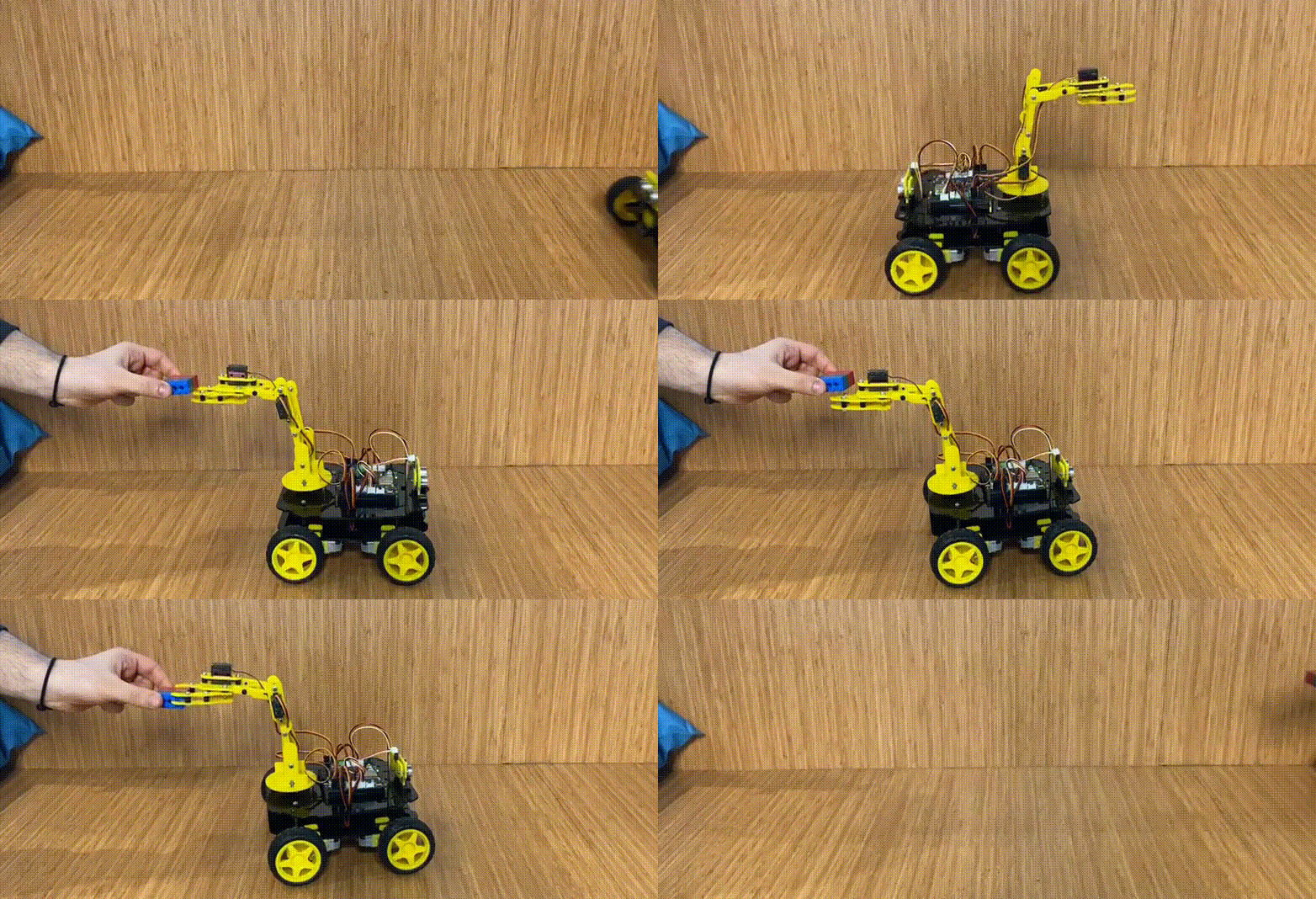
Introducing ArmBot, the amazing REX robot! 🚀🤖 ArmBot is equipped with a powerful robot arm 🤖💪, powered by 4 servo motors. With this ingenious feature, it can remotely control objects around it, making moving things from one point to another a breeze! 🎮📦 This incredible robot arm can move in 4 different axes: up, down, right, and left, making it super versatile and agile! 💨💨 It can easily reach even the most challenging objects that were once hard to access. 🎯🏆No matter where an item is located, ArmBot can swiftly reach it with precision and grace. Its remarkable remote control capabilities enable it to handle tasks efficiently and effortlessly. 🎮🚀 ArmBot is here to revolutionize the way we interact with our surroundings! Say hello to the future of efficient object manipulation with this fantastic robotic companion!
ArmBot Arduino C Code
//"""REX 8in1 Arm Bot"""
//Check the web site for Robots https://rex-rdt.readthedocs.io/en/latest/

#define CUSTOM_SETTINGS
#define INCLUDE_GAMEPAD_MODULE
#include <DabbleESP32.h>
#include <Arduino.h>
#include <ESP32Servo.h>

enum MOTOR_TYPE {
  DC_MOTOR,
  SERVO_MOTOR
};

enum MOTOR_TYPE motorType = DC_MOTOR;

//define Motor Pins
#define MotorA1 15  // Forward
#define MotorA2 23  // Backward

#define MotorB1 32  // Forward
#define MotorB2 33  // Backward

#define MotorC1 5  // Forward
#define MotorC2 4  // Backward

#define MotorD1 27  // Forward
#define MotorD2 14  // Backward

int position1 = 90;
int position2 = 90;
int position3 = 90;
int position4 = 90;

//define buzzer pin named "horn"
int horn = 25;

//define pins of servo motors
Servo Servo1;  // Forward-Bakcward
Servo Servo2;  // Right-Legt
Servo Servo3;  // Up-Down
Servo Servo4;  // Open-Close

void setup() {
  ESP32PWM::allocateTimer(0);
  ESP32PWM::allocateTimer(1);
  ESP32PWM::allocateTimer(2);
  ESP32PWM::allocateTimer(3);

  Servo1.setPeriodHertz(50);
  Servo2.setPeriodHertz(50);
  Servo3.setPeriodHertz(50);
  Servo4.setPeriodHertz(50);
  //defined active pins
  pinMode(horn, OUTPUT);

  Servo1.attach(2, 600, 2500);
  Servo2.attach(26, 600, 2500);
  Servo3.attach(18, 600, 2500);
  Servo4.attach(19, 600, 2500);

  //first positions of servo motors
  Servo1.write(position1);
  Servo2.write(position2);
  Servo3.write(position3);
  Servo4.write(position4);


  pinMode(MotorA1, OUTPUT);
  pinMode(MotorA2, OUTPUT);

  pinMode(MotorB1, OUTPUT);
  pinMode(MotorB2, OUTPUT);

  pinMode(MotorC1, OUTPUT);
  pinMode(MotorC2, OUTPUT);

  pinMode(MotorD1, OUTPUT);
  pinMode(MotorD2, OUTPUT);

  Serial.begin(115200);       // make sure your Serial Monitor is also set at this baud rate.
  Dabble.begin("REX_ROBOT");  //set bluetooth name of your device
}

void loop() {
  //Print of servo motor position on Serial Port
  /*Serial.println(position1);
    Serial.println(position2);
    Serial.println(position3);
    Serial.println(position4);*/

  //This function is used to keep information coming from the mobile device up to date.
  Dabble.processInput();
  stop();

  if (GamePad.isSelectPressed()) {
    motorType = SERVO_MOTOR;
    digitalWrite(horn, HIGH);
    delay(100);
    digitalWrite(horn, LOW);
    delay(1);

    int position1 = 90;
    int position2 = 90;
    int position3 = 90;
    int position4 = 90;

  }
  if (GamePad.isStartPressed()) {
    motorType = DC_MOTOR;
    digitalWrite(horn, HIGH);
    delay(100);
    digitalWrite(horn, LOW);
    delay(1);
    digitalWrite(horn, HIGH);
    delay(100);
    digitalWrite(horn, LOW);
    delay(1);
  }

  switch (motorType) {
    case DC_MOTOR:
      //Serial.println("DC Turn On");
      dc_motor();
      break;
    case SERVO_MOTOR:
      //erial.println("Servo Turn On");
      servo_motor();

      break;
  }

  //Serial.println('\t');
  int a = GamePad.getAngle();
  /*Serial.print("Angle: ");
    Serial.print(a);
    Serial.print('\t');*/

  int b = GamePad.getRadius();
  /*Serial.print("Radius: ");
    Serial.print(b);
    Serial.print('\t');*/

  float c = GamePad.getXaxisData();
  /*Serial.print("x_axis: ");
    Serial.print(c);
    Serial.print('\t');*/

  float d = GamePad.getYaxisData();
  /*Serial.print("y_axis: ");
    Serial.println(d);
    Serial.println();*/
}

void servo_motor() {

  if (GamePad.isUpPressed()) {
    if (position2 > 0) {
      position2 = position2 - 1;
    }
  }
  if (GamePad.isDownPressed()) {
    if (position2 < 140) {
      position2 = position2 + 1;
    }
  }
  if (GamePad.isRightPressed()) {
    if (position1 < 140) {
      position1 = position1 + 1;
    }
  }
  if (GamePad.isLeftPressed()) {
    if (position1 > 40) {
      position1 = position1 - 1;
    }
  }
  if (GamePad.isSquarePressed()) {
    if (position4 < 160) {
      position4 = position4 + 1;
    }
  }

  if (GamePad.isCirclePressed()) {
    if (position4 > 90) {
      position4 = position4 - 1;
    }
  }

  if (GamePad.isCrossPressed()) {
    if (position3 > 30) {
      position3 = position3 - 1;
    }
  }

  if (GamePad.isTrianglePressed()) {
    if (position3 < 150) {
      position3 = position3 + 1;
    }
  }

  delay(10);

  Servo1.write(position1);
  Servo2.write(position2);
  Servo3.write(position3);
  Servo4.write(position4);
}

void dc_motor() {
  if (GamePad.isUpPressed()) {
    forward();
  }

  if (GamePad.isDownPressed()) {
    backward();
  }

  if (GamePad.isLeftPressed()) {
    left();
  }

  if (GamePad.isRightPressed()) {
    right();
  }
  if (GamePad.isSquarePressed()) {
  }

  if (GamePad.isCirclePressed()) {
    for (int i = 0; i < 3; i++) {
      forward();
      digitalWrite(horn, HIGH);
      delay(300);
      digitalWrite(horn, LOW);
      delay(300);
      left();
      digitalWrite(horn, HIGH);
      delay(400);
      digitalWrite(horn, LOW);
      delay(300);
      right();
      digitalWrite(horn, HIGH);
      delay(500);
      digitalWrite(horn, LOW);
      delay(300);
      digitalWrite(horn, HIGH);
      delay(600);
      digitalWrite(horn, LOW);
      left();
      delay(300);
    }
  }

  if (GamePad.isCrossPressed()) {
    //Serial.print("DC Cross");
    digitalWrite(horn, HIGH);
    delay(200);
    digitalWrite(horn, LOW);
    delay(1);
  }

  if (GamePad.isTrianglePressed()) {
    //Serial.print("DC Triangle");
    Servo1.write(90);
    Servo2.write(90);
    Servo3.write(90);
    Servo4.write(90);
  }
}

void forward() {
  digitalWrite(MotorA1, HIGH);
  digitalWrite(MotorA2, LOW);

  digitalWrite(MotorB1, HIGH);
  digitalWrite(MotorB2, LOW);

  digitalWrite(MotorC1, HIGH);
  digitalWrite(MotorC2, LOW);

  digitalWrite(MotorD1, HIGH);
  digitalWrite(MotorD2, LOW);
}

void right() {
  digitalWrite(MotorA1, HIGH);
  digitalWrite(MotorA2, LOW);

  digitalWrite(MotorB1, HIGH);
  digitalWrite(MotorB2, LOW);

  digitalWrite(MotorC1, LOW);
  digitalWrite(MotorC2, HIGH);

  digitalWrite(MotorD1, LOW);
  digitalWrite(MotorD2, HIGH);
}

void left() {
  digitalWrite(MotorA1, LOW);
  digitalWrite(MotorA2, HIGH);

  digitalWrite(MotorB1, LOW);
  digitalWrite(MotorB2, HIGH);

  digitalWrite(MotorC1, HIGH);
  digitalWrite(MotorC2, LOW);

  digitalWrite(MotorD1, HIGH);
  digitalWrite(MotorD2, LOW);
}

void stop() {
  digitalWrite(MotorA1, LOW);
  digitalWrite(MotorA2, LOW);

  digitalWrite(MotorB1, LOW);
  digitalWrite(MotorB2, LOW);

  digitalWrite(MotorC1, LOW);
  digitalWrite(MotorC2, LOW);

  digitalWrite(MotorD1, LOW);
  digitalWrite(MotorD2, LOW);
}

void backward() {
  digitalWrite(MotorA1, LOW);
  digitalWrite(MotorA2, HIGH);

  digitalWrite(MotorB1, LOW);
  digitalWrite(MotorB2, HIGH);

  digitalWrite(MotorC1, LOW);
  digitalWrite(MotorC2, HIGH);

  digitalWrite(MotorD1, LOW);
  digitalWrite(MotorD2, HIGH);
}
ArmBot MicroPython Code
from machine import Pin, PWM
import bluetooth
from rex import BLESimplePeripheral, Servo
import time

# Create a Bluetooth Low Energy (BLE) object
ble = bluetooth.BLE()

# Create an instance of the BLESimplePeripheral class with the BLE object
sp = BLESimplePeripheral(ble)

#motorA
motor_A1 = PWM(Pin(15))
motor_A1.duty_u16(0)
motor_A2 = PWM(Pin(23))
motor_A2.duty_u16(0)

#motorB
motor_B1 = PWM(Pin(32))
motor_B1.duty_u16(0)
motor_B2 = PWM(Pin(33))
motor_B2.duty_u16(0)

#motorC
motor_C1 = PWM(Pin(5))
motor_C1.duty_u16(0)
motor_C2 = PWM(Pin(4))
motor_C2.duty_u16(0)

#motorD
motor_D1 = PWM(Pin(27))
motor_D1.duty_u16(0)
motor_D2 = PWM(Pin(14))
motor_D2.duty_u16(0)

#servo
Servo1 = Servo(2)
Servo2 = Servo(26)
Servo3 = Servo(18)
Servo4 = Servo(19)

#buzzer
buzzer = Pin(25, Pin.OUT)

position1 = 90;
position2 = 90;
position3 = 90;
position4 = 90;

playBuzzer = 0
buzzerStartTime = 0
Motor_Type = 0

#motor types (default is 0)
DC_Motor = 0
Servo_Motor = 1

#default motor speed
MotorSpeed = 65535

def forward(speed):
   motor_A1.duty_u16(speed)
   motor_A2.duty_u16(0)

   motor_B1.duty_u16(speed)
   motor_B2.duty_u16(0)

   motor_C1.duty_u16(speed)
   motor_C2.duty_u16(0)

   motor_D1.duty_u16(speed)
   motor_D2.duty_u16(0)

def backward(speed):
   motor_A1.duty_u16(0)
   motor_A2.duty_u16(speed)

   motor_B1.duty_u16(0)
   motor_B2.duty_u16(speed)

   motor_C1.duty_u16(0)
   motor_C2.duty_u16(speed)

   motor_D1.duty_u16(0)
   motor_D2.duty_u16(speed)

def right(speed):
   motor_A1.duty_u16(speed)
   motor_A2.duty_u16(0)

   motor_B1.duty_u16(speed)
   motor_B2.duty_u16(0)

   motor_C1.duty_u16(0)
   motor_C2.duty_u16(speed)

   motor_D1.duty_u16(0)
   motor_D2.duty_u16(speed)

def left(speed):
   motor_A1.duty_u16(0)
   motor_A2.duty_u16(speed)

   motor_B1.duty_u16(0)
   motor_B2.duty_u16(speed)

   motor_C1.duty_u16(speed)
   motor_C2.duty_u16(0)

   motor_D1.duty_u16(speed)
   motor_D2.duty_u16(0)

def stop():
   motor_A1.duty_u16(0)
   motor_A2.duty_u16(0)

   motor_B1.duty_u16(0)
   motor_B2.duty_u16(0)

   motor_C1.duty_u16(0)
   motor_C2.duty_u16(0)

   motor_D1.duty_u16(0)
   motor_D2.duty_u16(0)

# Define a callback function to handle received data
def on_rx(data):
    global buzzerStartTime, playBuzzer, Motor_Type, Servo_Motor, DC_Motor, position1, position2, position3, position4
    print("Data received: ", data)  # Print the received data

    last_mode = Motor_Type
    if data == b'\xff\x01\x01\x01\x02\x02\x00\x00': #select
        Motor_Type = Servo_Motor
    elif data == b'\xff\x01\x01\x01\x02\x01\x00\x00': #start
        Motor_Type = DC_Motor
    else:
        Motor_Type = last_mode

    if Motor_Type == Servo_Motor:
        if data == b'\xff\x01\x01\x01\x02\x00\x01\x00': #up
            if position2 > 0:
                position2 -= 5
        if data == b'\xff\x01\x01\x01\x02\x00\x02\x00': #down
            if (position2 < 140):
                position2 += 5
        if data == b'\xff\x01\x01\x01\x02\x00\x04\x00': #left
            if (position1 > 40):
                position1 -= 5
        if data == b'\xff\x01\x01\x01\x02\x00\x08\x00': #right
            if (position1 < 140):
                position1 += 5
        if data == b'\xff\x01\x01\x01\x02\x04\x00\x00': #trigle
            if (position3 < 150):
                position3 += 5
        if data == b'\xff\x01\x01\x01\x02 \x00\x00': #square
            if (position4 < 160):
                position4 += 5
        if data == b'\xff\x01\x01\x01\x02\x08\x00\x00': #circle
            if (position4 > 90):
                position4 -= 5
        if data == b'\xff\x01\x01\x01\x02\x10\x00\x00': #cross
            if (position3 > 30):
                position3 -= 5

        Servo1.move(position1)
        Servo2.move(position2)
        Servo3.move(position3)
        Servo4.move(position4)
    else:
        if data == b'\xff\x01\x01\x01\x02\x00\x01\x00': #up
            forward(MotorSpeed)
        elif data == b'\xff\x01\x01\x01\x02\x00\x02\x00': #down
            backward(MotorSpeed)
        elif data == b'\xff\x01\x01\x01\x02\x00\x04\x00': #left
            left(MotorSpeed)
        elif data == b'\xff\x01\x01\x01\x02\x00\x08\x00': #right
            right(MotorSpeed)
        elif data == b'\xff\x01\x01\x01\x02\x04\x00\x00': #trigle
            print("trigle")
        elif data == b'\xff\x01\x01\x01\x02 \x00\x00': #square
            print("square")
        elif data == b'\xff\x01\x01\x01\x02\x08\x00\x00': #circle
            print("circle")
        elif data == b'\xff\x01\x01\x01\x02\x10\x00\x00': #cross
            buzzerStartTime = time.ticks_ms()
            playBuzzer = 1
            buzzer.value(1)
        else:
            stop()
while True:
    currentTime = time.ticks_ms()
    if (playBuzzer == 1) and (time.ticks_diff(currentTime, buzzerStartTime) > 1000):
         buzzer.value(0)
         playBuzzer = 0

    if sp.is_connected():  # Check if a BLE connection is established
        sp.on_write(on_rx)  # Set the callback function for data reception